


In construction, the biggest operational risk usually isn’t pouring concrete, managing labour, or procuring materials — it’s making sure what happens on-site is accurately reflected in the accounting system.
That’s the exact gap our ERPNext Construction Module is built to close.
In most construction companies, site engineers and finance teams work off different tools, different reports, and sometimes different versions of the truth. Left unresolved, this creates:
- Delayed project billing
- Manual spreadsheet reconciliation
- Unclear project profitability
- Errors in material and labour costing
- Limited real-time visibility for management
If any of that sounds familiar, you’re not alone — it’s the single most common reason construction companies start looking for a dedicated Construction ERP software instead of patching together spreadsheets and disconnected tools.
Why We Built an ERPNext Construction Management Module
Instead of building another standalone construction ERP from scratch, we extended Frappe and ERPNext with construction-specific workflows.
ERPNext already gives you a strong foundation — accounting, inventory, purchasing, payroll, and finance. What’s missing for most contractors is the construction execution layer.
Our Construction Management module is that missing layer. It connects daily site activity directly to ERPNext’s financial processes, so nothing has to be re-entered, reconciled, or guessed at month-end.
From Project Setup to Financial Tracking — Automatically
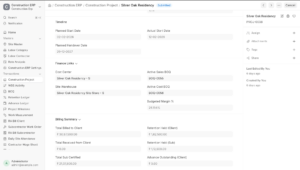
Every construction project starts with a Site Master and a Construction Project record.
Once a project is approved, the system automatically creates:
- A dedicated Cost Center
- A Site Warehouse
This means every material issue, expense, purchase order, and labour cost is automatically tied to the correct project — no manual accounting decisions, no end-of-month guesswork about which project a cost belongs to.
Better Cost Visibility with Rate Analysis and BOQs
Before execution even begins, contractors need clarity on both estimated cost and expected revenue. This is where most spreadsheet-based systems fall apart — and where our BOQ software for construction projects takes over.
The module gives you:
- Rate Analysis for materials, labour, machinery, and overheads
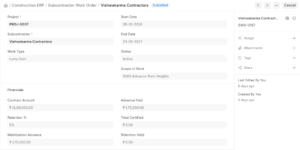
- Separate Cost BOQ and Sales BOQ
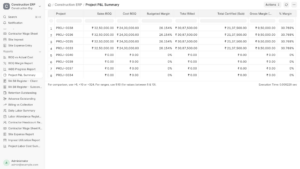
- Live project margin visibility
This lets your team monitor profitability from the planning stage — not discover a loss-making project three months after it started.
Simplifying Running Account (RA) Billing
RA billing is consistently one of the most time-consuming, error-prone tasks in construction finance — and one of the highest-searched pain points among teams evaluating RA billing software for construction.
Here’s how the module handles it: as work measurements are recorded against BOQ quantities, the system automatically calculates:
- Cumulative quantities
- Previously billed work
- Current billable quantities
- Retention
- Recoveries
Once approved, it generates the ERPNext Sales Invoice automatically – cutting out manual RA sheet calculations and reducing billing errors that would otherwise take days to catch.
Managing Subcontractors Without the Spreadsheet Chaos
Most construction projects run on multiple subcontractors, and subcontractor billing is usually where financial control breaks down fastest.
Our subcontractor management software layer inside ERPNext supports:
- Subcontractor Work Orders
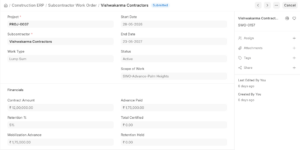
- Mobilization advances
- Retention management
- RA Bills for subcontractors
- Automatic Purchase Invoice generation
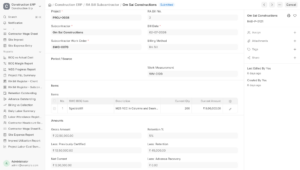
The result: one consistent, auditable workflow for both incoming (client) and outgoing (subcontractor) project billing – instead of two disconnected processes.
Daily Site Operations, Fully Traceable
Execution-level detail matters just as much as high-level billing. The module also covers:
- Attendance management for employees and contractor labour
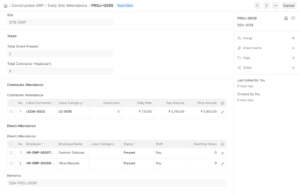
- Contractor wage calculations
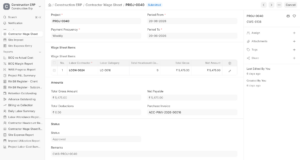
- Site imprest management
- Site expense approvals
- Workflow-based financial controls
This keeps a complete, traceable link between what happens on the ground and what lands in your accounting records — the core promise of a true construction ERP for contractors.
One Unified Construction Workspace
Instead of juggling multiple spreadsheets and disconnected tools, everything lives inside a single Construction Workspace:
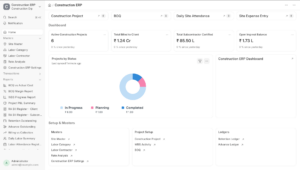
- Masters
- Daily Transactions
- Reports
- Live project metrics
- Financial summaries
Project managers, site engineers, and finance teams finally work off the same numbers — in real time, not at month-end reconciliation.
Looking Ahead
Construction companies don’t need another standalone ERP. They need construction workflows that integrate seamlessly with the ERP they already trust.
By extending Frappe and ERPNext with industry-specific functionality, our goal is simple: reduce manual reconciliation, improve project visibility, and create one single source of truth from planning through project completion.
This module is only the beginning — we’re actively refining it based on real-world construction projects and feedback from teams like yours.
If you’re working in construction, infrastructure, or project management, we’d love to hear about the operational challenges your team is facing – and how this module might help solve them.
Book a free demo of the ERPNext Construction Module Click Here
FAQ’S
Is ERPNext good for construction companies?
What is RA billing, and why is it hard to manage manually?
How does the module connect site activity to the accounts office?
What’s the difference between Cost BOQ and Sales BOQ?
Can ERPNext handle subcontractor billing and payments?
Does it track daily site operations like attendance and wages?
Do we need to replace our existing ERP to use this?